Welcome to the Imaris 4.0.5 release notes. In this version we have changed the
configuration of Imaris and introduced a lot of key features. Version Date: FEB
13, 2004.
|
Imaris
|
|
Topography
|
- The Module is now available as common Imaris module.
|
|
Image Processing
|
- Delete Slice
- Channel Shift
- Edge preserving Filter (anisotropic diffusion filter)
- Background Subtraction
- Connective Baseline
- Performance of Gaussian filter improved. The duration is no longer dependant on the filter size!
|
|
File I/O
|
- CellR reader
- CellR writer
- OME Xml reader
- OME Xml writer
- Nikon ICS reader
- Imaris 4D single file reader
- Imaris 4D single file writer
- Save Slice animation as AVI or Mpeg
|
|
Surpass
|
- Clipping Plane selectively clips objects.
- Extended Section in Ortho Slicer (+ and – on numeric keypad increases or decreases depth of field)
- Fast axis change on OrthoSlicer with right mouse button click in selection mode.
- Double Threshold Iso Surface
- Mask Channel from Surface Object and Iso Surface allowing users to work on arbitrary regions of interest.
|
|
Miscellaneous
|
- Flexlm Version 9.2
- License server all licenses checked out message
- Resizable channel visibility window
|
|
Imaris Time / Imaris Measurement Pro
|
|
File I/O
|
- Imaris 4D single file reader
- Imaris 4D single file writer
|
|
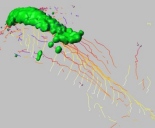
Tracking with Imaris
Track spots with 3 different algorithms: Brownian motion, autoregressive motion, or
new Diatrack algorithm from Semasopht.
|
|
Imaris FilamentTracer
|
|
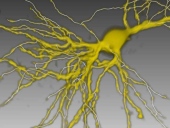
FilamentTracer
is a new module and has been released with Imaris 4.0.4. For the current release
the graphics performance and quality has been improoved. Multiple Filament objects
can now be merged into a single filament object.
|
|
Imaris Coloc
|
|
Miscellaneous
|
- different snapshots for image and histogram
|
|
Fixed Bugs (since Imaris 4.0.4)
|
| 347 | Fluoview Reader Error 347 |
| 463 | Save Imaris 3 datasets with a running number in the middle fails |
| 531 | ICS import from AD 9.1.2 fails |
| 538 | Tree List must be inactivated while loading scene |
| 566 | multiple imaris 4d files are interpreded as series |
| 571 | Show Object Shape slow |
| 575 | export -> load spot tracking scene causes unrecoverable error |
| 576 | Track scene looses time colormap property |
| 567 | Mask Channel results shows spikes |
| 372 | Position of light not correct restored with scene |
| 483 | Patchy AVI export |
| 519 | Imaris freezes when saved scene is loaded |
| 525 | contour disappears during image processing |
| 534 | Cancel track statistics calculation crashes Imaris |
| 535 | Shadow in Full3D shows ugly stripes |
| 542 | scene file restores wrong light position |
| 548 | FilamentTracer: Cancel graph compilation crashes Imaris |
| 560 | Crash when Track Group is selected |
| 577 | filamenttracer crash if progress is canceled |
| 580 | Refrence to wrong 4D dataset |
| 581 | Import of 4D Tiff series from Imaris fails |
| 582 | Repeated save as Tiff series does show all images which will be over written |
| 584 | Delete Spots Object crashes Imaris |
| 587 | Zeiss AxioVision channel are splitted |
| 590 | Measurement Point on Orthoslicer |
| 591 | 2D spot detection puts two spots in the same place |
| 592 | In Excel numbers with 1.## have wrong format. |
| 594 | fileopen crashes imaris if contour statistics viewer open |
| 343 | Olympus Fluoview parameters missing |
| 527 | Crash when opening lsm or STK files with Auto Format detection |
| 528 | ISO Resampling parameters |
| 533 | Crash if no valid license when FLEXLM_DIAGNOSTICS is set in the registry |
| 579 | Full3D blend animation shows black edges |
| 588 | read 2D overt time IM classic progressbar flickers |
| 589 | Slice distance measurement does not work on 2D image |
| 593 | 2D time reload fails |
| 595 | Wrong channel number in channel description |
| 596 | Interpolate allways on in Easy3D |
| 598 | Volume not updated when Threhold changed by typing |
| 599 | No column headers in Excel export |
| 600 | Drift correction changes voxel size |
|
Feedback
|
|
Any feedback on the installation, and the usage of the Beta products listed
above are more than welcome! Please send your comments directly to the product
management (
messerli@bitplane.com
)
|